A client once signed what he thought was a Business Central deal. The quote said “Dynamics 365.” The contract said “Finance and Supply Chain Management.” The difference was roughly $400,000 over three years, plus an implementation that was twice as long as the one he had budgeted for.
He was not careless. He was sold a category, not a product. “Microsoft ERP” is one of those phrases that sounds specific and means almost nothing until someone puts a product name on the order form.
Microsoft sells several ERP products. They share a logo, a partner channel, and some underlying technology. They do not share a price point, an implementation model, or a typical buyer. If you are evaluating Microsoft, the first job is to figure out which Microsoft you are actually talking to.
The family, explained
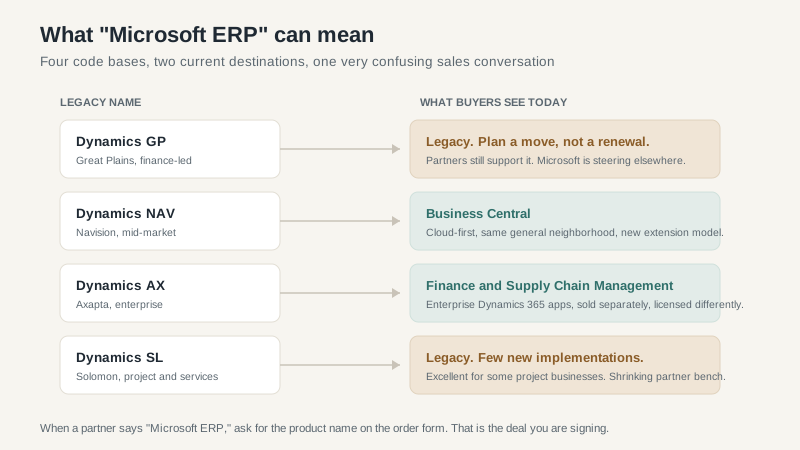
Dynamics 365 Business Central. The mid-market ERP, descended from Dynamics NAV. Finance, sales, purchasing, inventory, projects, and light manufacturing. Sold per user through Microsoft partners, available in the cloud or on-premises. This is what most people mean when they say Microsoft ERP for a company under a few hundred users.
Dynamics 365 Finance. The enterprise financial management app, descended from Dynamics AX. General ledger, accounts payable and receivable, budgeting, fixed assets, and global financial controls. Sold per user with base and attach licensing. Implementation is a serious program, not a three-month project.
Dynamics 365 Supply Chain Management. The enterprise operations app, also descended from AX. Production control, inventory, warehouse management, transportation, and planning. Often sold alongside Finance. Can be sold separately, which is where some of the licensing confusion starts.
Dynamics GP and SL. The older on-premises products. Still running in thousands of US companies. Microsoft is steering customers toward Business Central, and the partner bench for GP and SL is shrinking. If you are on one of these systems, the question is not whether to move. It is when and how.
Business Central: the mid-market workhorse
Business Central is a good product for the right company. It handles finance, purchasing, sales, inventory, projects, and basic manufacturing in one system. The cloud version updates twice a year. The on-premises version exists for companies that need it. The partner channel is large, which means you can usually find someone who knows your industry.
The licensing is per user, with two editions: Essentials and Premium. Premium adds manufacturing and service management. List prices are published, which is refreshing after a round of quote-only enterprise vendors. The catch is that the published price is not the implementation price, and the implementation is where the budget goes.
A typical 50-user Business Central project runs four to eight months and costs more than the first two years of subscription. The variance comes from data migration, integrations, and how much you insist on recreating the old system’s screens. Companies that adopt the standard process move faster. Companies that treat Business Central like a custom development platform pay for it.
Where it struggles: very complex manufacturing, large multi-entity consolidations, and companies that need deep industry functionality. Business Central has add-ons for many industries, and some are excellent. The more add-ons you stack, the more you are buying a solution assembled by a partner, not a product. That can work. It is not the same as out-of-the-box fit.
Finance and Supply Chain: the enterprise path
The enterprise apps are a different sport. The licensing is base-plus-attach, with user minimums and module combinations that can surprise a company used to per-seat pricing. The implementation is usually nine to eighteen months. The partner is a systems integrator, not a local accounting firm. The budget is a capital project.
What you get is depth. Multi-company consolidation, advanced warehouse management, production control, global tax and regulatory support, and a data model that can handle a real enterprise. If you are a $200 million manufacturer with plants in three states and a distribution arm, Business Central may not have the depth. Finance and Supply Chain does.
The mistake is buying the enterprise product because it sounds more serious. I have seen $40 million companies sign up for Finance because the partner said they would grow into it. They spent two years and several million dollars implementing a system designed for a company five times their size. Growth is not a reason to buy complexity you cannot support today.
The partner channel is the real product
Microsoft does not implement ERP. Partners do. That means the quality of your project depends more on the partner than on the product name on the license.
Microsoft’s partner ecosystem includes global systems integrators, regional VARs, and small shops with two consultants and a logo. All of them can resell the license. Not all of them can implement it well.
Ask for the actual consultants who will be on your project. Ask for two live references on the exact product and version you are buying. Ask what happened on the last project that went over budget. A partner that cannot answer those questions is a reseller, not an implementation partner.
Also understand the incentives. Microsoft wants subscription revenue. The partner wants implementation and change-order revenue. Neither is evil, but neither is aligned with your total cost. You are the only person in the room whose job is to protect the business case.
How to read a Microsoft ERP quote
Before you compare numbers, make sure the quotes are for the same thing.
- Product name and edition. Business Central Essentials is not Finance. “Dynamics 365” is not a product.
- User count and user type. Full users versus team members. Named versus concurrent. The mix changes the price materially.
- Modules and add-ons. Manufacturing, warehouse, project accounting, and third-party add-ons may be separate.
- Implementation scope. Which entities, which integrations, how many data migrations, how much training. A fixed fee with vague scope is a change order waiting to happen.
- Term and renewal. A three-year subscription with a renewal uplift is a different deal than a one-year term. Ask for the renewal cap.
- What is not included. Data cleanup, integrations, backfill staffing, and post-go-live support are the usual gaps.
Which one fits
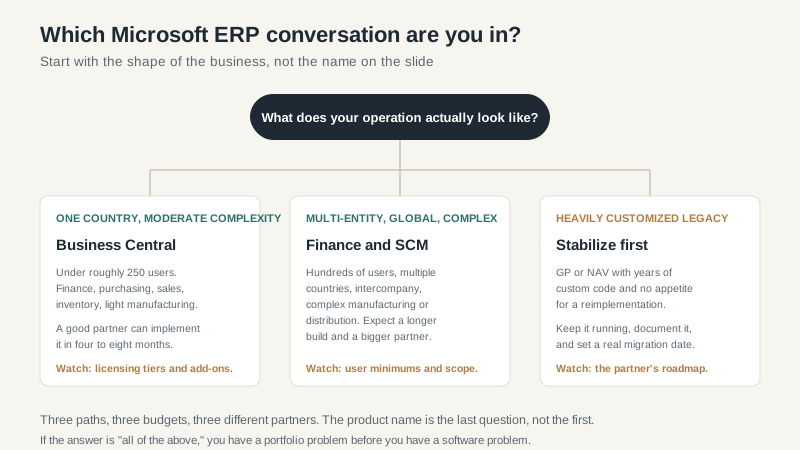
If you are a single-country company under roughly 250 users with moderate process complexity, Business Central is the natural starting point. If you are multi-entity, multi-country, and running complex manufacturing or distribution, Finance and Supply Chain deserves a look. If you are on GP or NAV with heavy customization and no appetite for a reimplementation, stabilize first and set a real migration date. Do not let a partner scare you into a project your organization cannot absorb.
For a deeper look at the enterprise licensing and implementation economics, the Dynamics 365 ERP guide goes into the numbers. If you are still deciding between Microsoft and the other big platforms, compare the NetSuite and Sage options before you commit. The right answer depends on where your complexity actually lives, not on which logo your IT director prefers.
