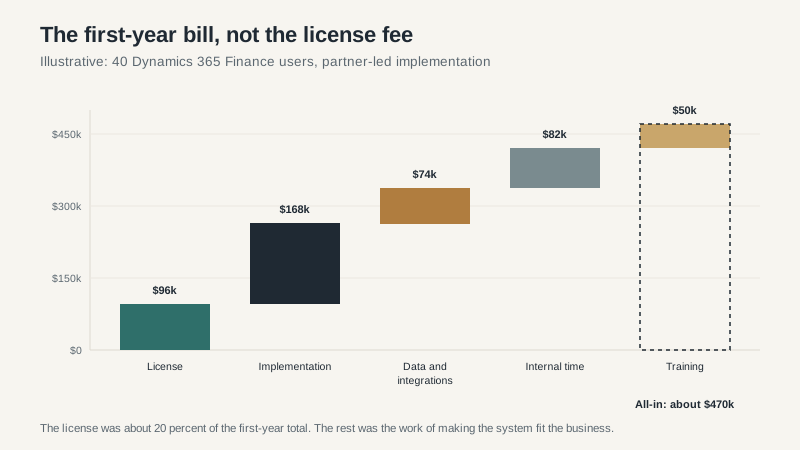
The first Dynamics 365 Finance quote I reviewed had a license line of $96,000 and a project total of $470,000. The CFO had approved the first number in a hallway conversation and spent the next six months explaining why the second one was not a surprise.
It was not a scam. The license was real. So were the implementation, the data cleanup, the integrations, the internal time, and the training. The quote was simply organized around the number the buyer wanted to see, not the number the project would cost.
Dynamics 365 ERP is a good fit for a lot of companies. It is also a licensing and implementation puzzle that rewards preparation. The license is the anchor. The program is the cost.
What “Dynamics 365 ERP” includes
Microsoft uses Dynamics 365 as an umbrella brand for a set of business applications. The ERP side includes Business Central, Finance, Supply Chain Management, Project Operations, Commerce, and Human Resources. They share a platform, an identity model, and a data layer, but they are sold and implemented separately.
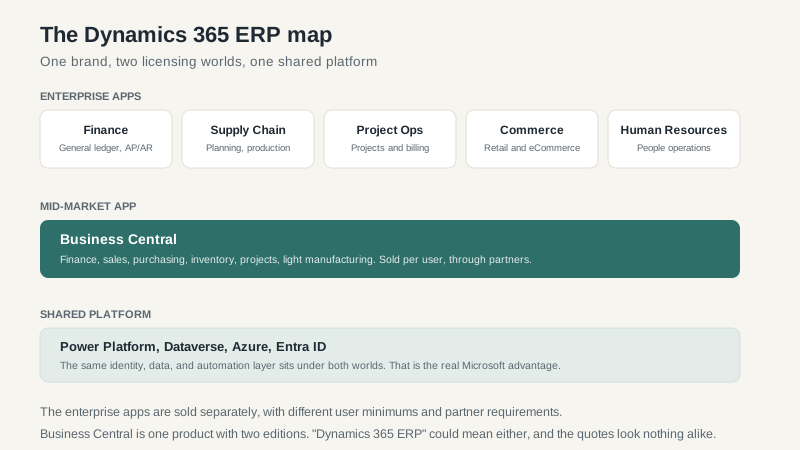
Business Central is the mid-market ERP. One product, two editions, per-user pricing, available in the cloud or on-premises. It covers finance, sales, purchasing, inventory, projects, and light manufacturing. Most companies under a few hundred users start here.
Finance and Supply Chain Management are the enterprise apps. They are sold per user with base and attach licensing, and they carry user minimums. Finance handles the general ledger, procurement, payables, receivables, and global financial controls. Supply Chain handles production, inventory, warehouse, transportation, and planning. They can be sold together or separately.
Project Operations is for project-based businesses that need estimating, resourcing, billing, and revenue recognition. Commerce covers retail and ecommerce. Human Resources covers core HR. These are separate apps with separate licenses and separate implementation scopes.
The shared platform is the real Microsoft advantage. Power Platform, Dataverse, Azure, and Entra ID sit underneath all of it. If your company already runs Microsoft 365, the identity and collaboration integration is genuinely useful. It is not a reason to buy the wrong ERP, but it is a real benefit when the product fits.
How the licensing works
Business Central is priced per user, per month, with two editions. Essentials covers finance, sales, purchasing, inventory, and projects. Premium adds manufacturing and service management. List prices are published and roughly in the $70 to $110 per user per month range, depending on the edition and term. Prices change, so check the current list, and remember that annual billing usually discounts the monthly rate.
Finance and Supply Chain are priced differently. There is a base license and attach licenses. A company might buy Finance as the base and attach Supply Chain Management for the users who need it. User minimums apply, and the minimums are the part that surprises small buyers. A 40-user company that wants the enterprise product may find that the licensing math assumes a much larger organization.
Team member licenses exist for light users. They are cheaper, and they have limits on what those users can do. A warehouse associate who only records time and expenses might fit. A controller who posts journal entries does not. Read the use rights carefully, because Microsoft’s definitions are specific and the audits are real.
All of this is subscription pricing. There is no perpetual license for the cloud apps. The annual cost continues for as long as you use the system, and renewal increases are a budget line. Negotiate a cap before you sign.
What implementation actually costs
A 60-user Business Central implementation with a moderate scope might carry $72,000 in partner services, $28,000 in data and integration work, $34,000 in internal time, and $11,000 in training on top of the license. That is a first-year total near $200,000 for a mid-market deployment.
The Finance quote from the opening was a different scale. The $96,000 license was accompanied by $168,000 in partner services, $74,000 in data and integration work, $82,000 in internal time, and $50,000 in training. The first-year total landed near $470,000. Enterprise ERP is not a bigger version of the mid-market deal. It is a different program.
Where the money goes:
- Process design and configuration. The partner maps your process, configures the system, and runs workshops. This is the visible part of the project.
- Data migration. Customer master, item master, open transactions, historical balances. Usually more work than the estimate, because the source data is messier than anyone admits.
- Integrations. Bank feeds, EDI, payroll, ecommerce, warehouse scanners, tax engines. Each one has an owner and an exception process.
- Testing and training. User acceptance testing, integration testing, and the training that actually changes behavior. The second one is usually underfunded.
- Internal time. The controller, operations manager, and IT lead who sit in workshops, make decisions, and test. Their payroll continues while the project runs.
- Post-go-live support. The first ninety days are not free. Budget for hypercare, whether from the partner or from your own team.
Microsoft’s FastTrack program can provide onboarding guidance for qualifying subscriptions. It is useful. It is not a substitute for an implementation partner, and it does not do your data migration.
Where the budget leaks
ISV add-ons. Microsoft’s ecosystem includes third-party solutions for industry functionality, document management, tax, and more. Some are excellent. Each one adds license cost, implementation time, and a vendor relationship to manage. Count them before you compare quotes.
Power Platform capacity. Power Apps, Power Automate, and Dataverse are part of the platform, but premium connectors and capacity can cost extra. If your integration strategy depends on Power Automate flows, price the licensing before you design the solution.
Report development. The standard reports are fine until the board wants a specific format. Report development is usually a separate scope, and it is often underestimated.
Customization. Business Central extensions are the supported path. Modifying the core is not. A partner who proposes core modifications is creating an upgrade problem for you, not solving one. Ask how the customization will survive the next release.
Renewal increases. The first-year subscription is a sales price. The renewal is a commercial negotiation. Ask for a multi-year cap and a definition of what happens when you add users or modules.
How to choose the right Dynamics 365 ERP
Start with size and complexity, not ambition. Business Central fits a single-country or lightly multi-national company with moderate process complexity. Finance and Supply Chain fit multi-entity, multi-country operations with complex manufacturing, distribution, or financial consolidation. Project Operations fits project-based businesses that need deep project accounting. Commerce fits retail and ecommerce at scale.
If a partner recommends the enterprise product before understanding your entities, currencies, manufacturing model, and internal capacity, slow down. Complexity has a carrying cost. You pay it every year in license fees, consultant hours, and the internal team that has to run the system.
Ask for references on the exact product and edition. Ask what the last upgrade cost. Ask how many of their customers are on the current release. Ask what happens when Microsoft changes a feature that your process depends on. The answers will tell you more than any demo.
How to negotiate
- Normalize the quotes. Same users, same modules, same implementation scope. Otherwise you are comparing fiction.
- Separate license from services. Negotiate them independently. A discount on the license can be recovered in the implementation.
- Cap the renewal. Get the annual increase in writing, or at least a cap.
- Tie payments to milestones. Discovery, configuration, UAT, go-live. Not a single payment schedule that pays the partner before the work is done.
- Name acceptance criteria. “Go-live” is not a criterion. “The month-end close runs in the new system with the agreed reports” is.
Dynamics 365 ERP can be a strong platform for the right company, especially one already invested in Microsoft’s ecosystem. The licensing is public enough to anchor a budget and complex enough to blow one. Treat the license as the starting line, not the finish.
For the product-family context, read the Microsoft ERP overview and the Dynamics ERP family guide. If you are still comparing vendors, the ERP software buying guide covers the selection process end to end.
