Odoo has the most persuasive pricing page in ERP. It has actual numbers on it, in public, without a “contact sales” gate. For a buyer who has spent three weeks chasing quote-only vendors, that is refreshing.
It is also incomplete. The subscription is real. The implementation is real. The customization your team will inevitably request is real, and it has a maintenance cost that does not appear on the pricing page.
I have seen Odoo go live in nine weeks for a 30-person wholesaler at a total cost below the first-year quote from a larger vendor. I have also watched a 120-person manufacturer spend eighteen months building custom modules that broke on the next upgrade. Both projects used Odoo. The difference was scope discipline.
What Odoo is
Odoo is a Belgian software company that sells a modular business application suite. The core is open source. The paid Enterprise edition adds features, hosting, support, and the Studio customization tool. Every app reads and writes the same database, which is the pitch: one system for sales, finance, inventory, manufacturing, projects, HR, and the website.
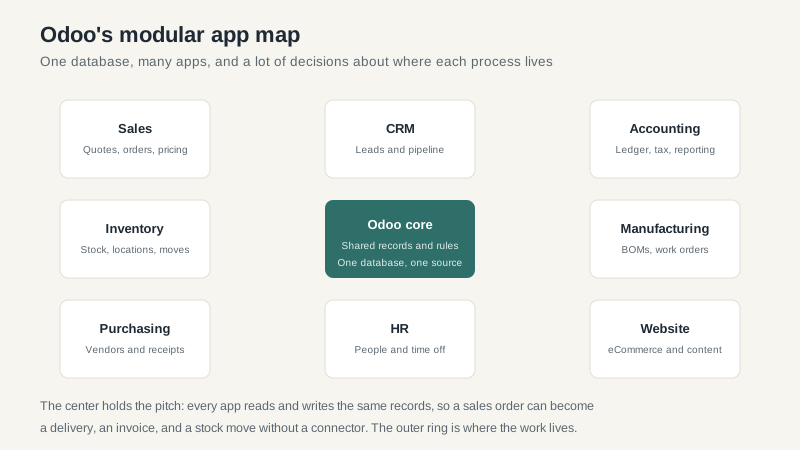
The app model is the strength and the risk. Strength because you can start with accounting and inventory, add manufacturing later, and avoid a second system. Risk because every app has its own assumptions, and the seams between them are where implementation time goes.
Community versus Enterprise
Odoo Community is free under an open-source license. You can download it, host it, and run a business on it. That is a legitimate option for a technical team with a small scope and a willingness to own the infrastructure.
For most companies, Enterprise is the practical choice. It includes the hosted service, the Studio customization tool, accounting localizations, payroll in some countries, and support. The subscription is per user per month, with discounts for annual billing. List prices change, but budget roughly $25 to $50 per user per month depending on the edition and term.
There is also a free plan for a single app, which is a clever way to get a small team onto the platform. Read the limits carefully. One app means one app, and the moment you need accounting plus inventory, you are in a paid plan.
The cost stack
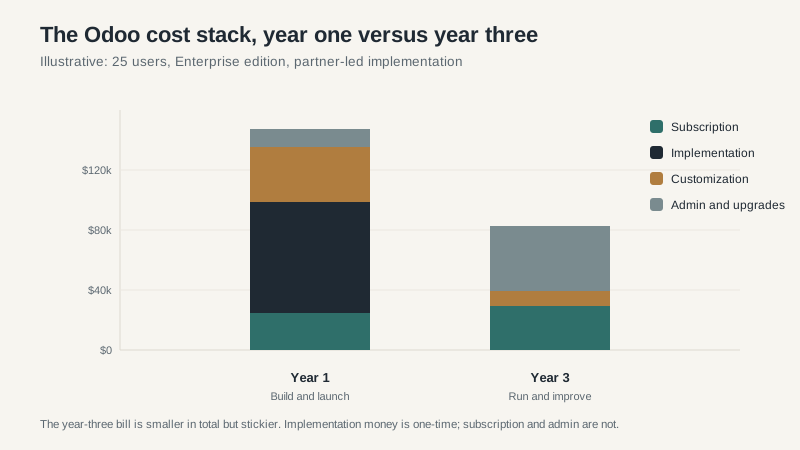
Year one is implementation and customization. A partner maps your process, configures the apps, migrates data, builds reports, and trains users. For a 25-user company with a moderate scope, that might be $30,000 to $80,000 depending on the partner and how much you change. The subscription is a small line next to it.
Year three is different. The implementation is behind you. What remains is subscription, the partner work you need for changes, and the internal admin who owns the system. If you built custom code, you also have an upgrade project waiting.
That is not a reason to avoid Odoo. It is a reason to treat the sticker price as the beginning of the budget, not the end.
Where Odoo fits well
Small and mid-market companies with standard processes. Services firms, wholesalers, ecommerce businesses, and light manufacturers that can adapt to the app’s defaults. Odoo’s accounting, sales, purchase, and inventory apps are coherent, and the price is hard to beat for the breadth.
Companies that want one system without an enterprise program. If your current stack is QuickBooks plus a spreadsheet plus an ecommerce platform plus a warehouse tool, Odoo can replace several of them at once. The integration savings are real.
Teams with technical capacity. Odoo rewards companies that can read documentation, test properly, and manage a partner. If you have an internal IT person who enjoys the system, you will get more out of it than a company that outsources everything.
Where Odoo struggles
Complex manufacturing. Odoo has a manufacturing app, and it is better than many people expect. It is not Epicor or Sage X3. If you have deep routings, co-products, configure-to-order with engineering rules, and a shop floor that runs on work instructions, you will spend a lot of time in customization. At that point, the cost advantage evaporates.
Regulated and multi-country operations. Localization quality varies by country. US sales tax, payroll, and statutory reporting usually need a partner or a third-party integration. Multi-entity consolidation exists, but it is not the same depth as NetSuite OneWorld or Sage Intacct.
Large user counts with complex permissions. Odoo can handle a few hundred users. It is not designed for thousands of users across dozens of entities with granular role hierarchies. The licensing is per user, which also gets expensive at scale.
Companies that need a large partner bench. Odoo’s partner network is global, but quality is uneven. Some partners are excellent. Some are learning on your project. The certification badge is not a substitute for a reference call.
The customization trap
Odoo Studio makes it easy to add a field, change a form, or build a small automation. That is good for a finance team that needs one more approval step. It is dangerous for a company that decides to rebuild its industry-specific workflow inside Odoo.
Custom code has three costs. The first is the build. The second is the upgrade, because major versions arrive every year and custom modules need testing and sometimes rewriting. The third is the knowledge, because the consultant who built it may not be around in two years.
My rule: configure before you customize, and customize before you write code. If you must write code, keep it in a separate module with tests and documentation, and budget for the upgrade every year. A fork of the core is not a strategy.
How to implement Odoo without regret
- Limit the first phase. Accounting, sales, purchase, inventory. Get those working before you add manufacturing, HR, and the website.
- Write the process down. Odoo partners price on scope. A vague scope becomes a change order.
- Ask for references in your country and industry. Not a logo page. Two companies you can call.
- Budget for the upgrade. Even if you skip a version, the eventual move is a project. Set aside money every year.
- Name an internal owner. Odoo is configurable enough that someone inside has to own the decisions. A partner cannot do that for you.
Who should choose Odoo
If you are a small or mid-market company with standard processes, a limited budget, and a willingness to adapt, Odoo is a serious option. It is real software with a real community, and the total cost can be well below the enterprise vendors.
If you are a complex manufacturer, a regulated business, or a company that needs deep industry functionality out of the box, look at Epicor ERP or Sage ERP first. Odoo can still be made to work, but you will be paying for flexibility in consultant hours.
The pricing page is honest about the subscription. It is silent about the rest. Go in with your eyes open, and you will get a lot of system for the money.
