Four letters that sound like one product: GP, NAV, AX, SL. Buyers hear “Dynamics” and assume they are comparing versions of the same thing. They are not. They are comparing four code bases with different histories, different support horizons, and different futures.
A manufacturer I worked with ran Dynamics AX 2012 R3 for eleven years. It was customized within an inch of its life and still closed the books. When the company finally decided to move, it got two quotes: one for Business Central and one for Finance and Supply Chain Management. The difference was more than three times the cost. Both partners called their proposal “Dynamics ERP.”
This is why the family tree matters. It is not trivia. It is the difference between a migration and a reimplementation, and between a budget that holds and one that does not.
How the family got here
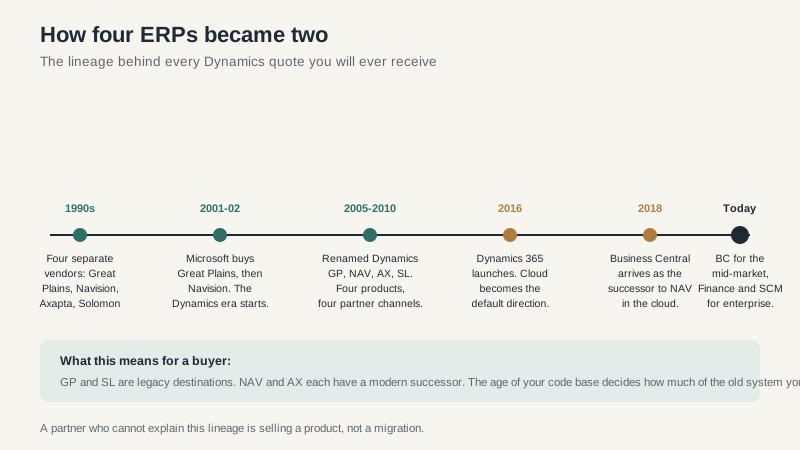
Microsoft bought Great Plains in 2001 and Navision in 2002. Navision owned Axapta, which became Dynamics AX. Solomon became Dynamics SL. For a while, Microsoft sold four ERP products to different segments and let a partner channel sort out the overlap.
That worked for a decade. Then the cloud changed the economics. In 2016, Microsoft launched Dynamics 365 and began consolidating the portfolio. NAV became Business Central in 2018. AX became Finance and Supply Chain Management. GP and SL were left on a slower track, with support but not much new investment.
The result is a family with two current destinations and two legacy branches.
The four legacy products
Dynamics GP. Great Plains. Finance-led, popular with mid-market distributors and service companies. Still supported, still implemented by a shrinking partner bench, no longer where Microsoft is investing. If you are on GP, you have time, but not unlimited time. The best migration window is before your partner retires.
Dynamics NAV. Navision. The direct ancestor of Business Central. Companies on NAV 2018 are in extended support. The move to Business Central is a reimplementation, not a technical upgrade, even though the product lineage is direct. The data model and customization approach changed.
Dynamics AX. Axapta. The enterprise product. AX 2012 is out of support, and companies still running it are making a decision whether they like it or not. The successor is Finance and Supply Chain Management, a cloud-only product with a different extension model. AX customizations do not carry forward automatically.
Dynamics SL. Solomon. Project and services-oriented, with a loyal but small base. Few new implementations. If you are on SL, the strategic question is whether Business Central or a vertical project system fits better, not whether to upgrade SL.
The two current destinations
Business Central. The mid-market ERP. Finance, sales, purchasing, inventory, projects, and light manufacturing. Per-user licensing with published list prices. Available in the cloud or on-premises. Implementation typically runs four to eight months for a moderate scope. This is the right destination for most NAV and GP customers, and for plenty of companies that never ran Microsoft at all.
Finance and Supply Chain Management. The enterprise ERP. General ledger, procurement, production control, warehouse management, transportation, and global financial consolidation. Cloud only. Base-plus-attach licensing with user minimums. Implementation typically runs nine to eighteen months. This is the right destination for AX customers with genuine enterprise complexity, and for large companies that need the depth.
The mistake is assuming that bigger means safer. One manufacturer I worked with bought Finance and Supply Chain because its partner said the company would grow into it. The rollout took nineteen months and consumed the internal team for most of two years. Revenue did grow. The system’s complexity grew faster. Business Central would have handled the business they actually had, and they could have moved again later if they truly outgrew it.
The migration question
Every legacy Dynamics customer faces the same choice: stay, move to Business Central, or move to Finance and Supply Chain. The answer depends on five things.
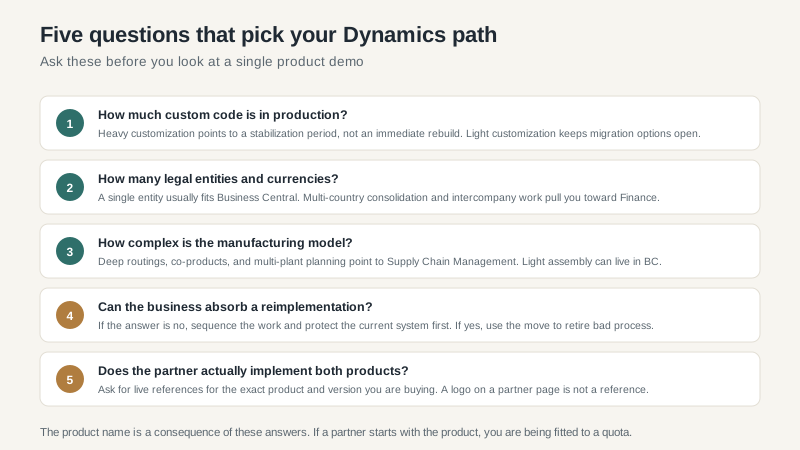
How much custom code is in production? Heavy customization points to a stabilization period, not an immediate rebuild. Light customization keeps migration options open. Get an inventory of customizations before you get a quote. The partner will price the project based on what they can see.
How many legal entities and currencies? A single entity usually fits Business Central. Multi-country consolidation and intercompany work pull you toward Finance. There is a middle ground, but it requires an honest look at the consolidation process, not just the org chart.
How complex is the manufacturing model? Deep routings, co-products, multi-plant planning, and complex costing point to Supply Chain Management. Light assembly can live in Business Central. If the partner has not implemented manufacturing in the product you are considering, find another partner.
Can the business absorb a reimplementation? A migration is a project even when the vendor calls it an upgrade. Data cleanup, integration rebuilds, retraining, and process redesign all land on the same internal team. If the business is in a turnaround or an acquisition, sequence the work and protect the current system first.
Does the partner actually implement both products? Many partners specialize in one. A Business Central partner will rarely recommend Finance, and an enterprise partner will rarely recommend Business Central. That is not necessarily dishonest. It is a capacity constraint. Ask for live references for the exact product and version you are buying.
Licensing, without the fog
Business Central licenses per user, with Essentials and Premium editions. The published prices are a useful anchor, and the add-on ecosystem is large. Finance and Supply Chain license per user with base and attach combinations, and user minimums that can surprise a company used to per-seat pricing. Team member licenses exist for light users, but the definition matters. A warehouse supervisor who approves time is not the same as a user who posts journal entries.
Do not compare a Business Central quote to a Finance quote without normalizing the user count, modules, and implementation scope. They are different products with different economics. The fact that both say “Dynamics 365” on the invoice is a branding decision, not a pricing decision.
Common mistakes
- Treating “Dynamics” as one product. Get the product name and edition on every quote.
- Buying the enterprise product too early. Complexity has a carrying cost. Pay for it when the business actually needs it.
- Staying on an unsupported version too long. The migration does not get cheaper. The partner bench gets smaller and the risk gets larger.
- Customizing during the migration. The move is the best chance to retire bad process. Rebuilding every customization is how companies arrive at the new system with the old problems.
- Skipping the reference calls. Two live customers, same product, same industry, two years in. Ask what broke in month seven.
Who should choose which
If you are a mid-market company with standard to moderately complex processes, Business Central is the default. If you are an AX customer with multi-plant manufacturing, global entities, and the budget for a serious program, Finance and Supply Chain is the path. If you are on GP or SL, start with a business case, not a demo. The right answer may be Business Central, or it may be a different vendor entirely.
For the licensing and cost detail, the Dynamics 365 ERP guide continues where this leaves off. If you are comparing Microsoft with the rest of the market, the Microsoft ERP overview and the ERP software buying guide will help you frame the decision.
