Cloud ERP does not make the cost disappear. It changes the shape of the bill.
A food producer I worked with put two seven-year projections in front of its board. The on-premises option looked $600,000 cheaper in year one. The cloud option looked expensive every single year. Then the CFO asked what happened in year four, when the servers needed replacing and the IT manager who knew the old system was planning to retire. The on-premises number moved. The cloud number did not.
They chose cloud. Not because cloud was cheaper on day one. Because the company could see the whole curve and knew what it was buying.
What cloud ERP actually means
“Cloud ERP” gets used for three different things, and vendors are not always careful about the distinction.
Multi-tenant SaaS. The vendor runs one code base, you subscribe per user or per module, and updates arrive on a schedule you do not control. Oracle Fusion Cloud ERP, NetSuite, Dynamics 365 Business Central online, and most modern mid-market products work this way. You configure the system. You do not own the infrastructure.
Single-tenant hosted. Your own instance, running in someone else’s data center. It looks like cloud on the invoice and behaves like on-premises in practice. You still manage upgrades, and you still need someone who understands the server stack.
Private cloud. A dedicated environment with cloud characteristics, often used by companies with data residency or customization requirements that SaaS cannot meet. It is a legitimate option. It is also the most expensive way to say “we did not want to change.”
Most of this article is about multi-tenant SaaS, because that is what most buyers mean and where the cost curve differs most.
The bill has a different shape
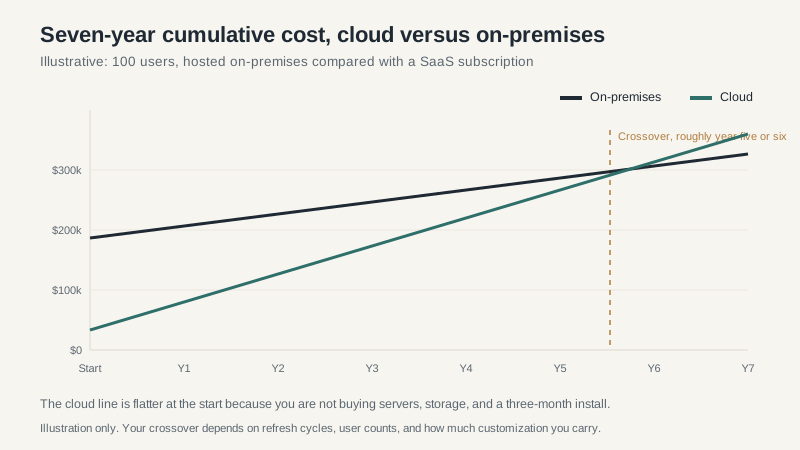
On-premises ERP front-loads the cost. Servers, storage, database licenses, implementation, and the people to run it. Then you pay maintenance, usually a percentage of the license, plus the periodic refresh that nobody puts in the original business case.
Cloud ERP spreads the cost across the term. Lower upfront, predictable monthly or annual payments, and the vendor handles infrastructure, patching, and major upgrades. Implementation is still yours. Data migration is still yours. Process redesign is still yours. The subscription buys the software and the plumbing, not the change management.
The crossover in the chart lands around year five or six for a typical 100-user mid-market company. That number moves a lot. A company with 40 users and light customization may never see on-premises win. A company with 800 users, heavy customization, and a modern data center may find on-premises cheaper for a decade. The point is not that one model always wins. The point is that the comparison has to cover the full horizon, including the refresh and the staffing.
Where cloud wins
Multiple locations and remote work. If your plants, warehouses, and finance team are in different time zones, cloud removes a category of problem. No VPN, no terminal server, no “the system is slow at the Ohio plant” ticket every Monday.
Limited IT bench. A company with one IT generalist should not be running an ERP data center. Cloud lets that person focus on integrations and user support instead of backups and patch windows.
Speed to value. A SaaS implementation can go live in three to six months for a mid-market scope. On-premises adds procurement, infrastructure, and environment build time before the first workshop even starts.
Vendor-managed compliance. SOC 2, encryption, disaster recovery, and patching are the vendor’s job. You still own access controls and data classification. You do not own the data center audit.
Predictable operating expense. Finance teams like subscription costs because they are easier to forecast than a capital request that shows up every five years with a bigger number than the last one.
Where cloud loses
Heavy customization. SaaS products punish deep changes. You can configure a lot, extend some, and integrate the rest. If your business depends on a workflow the vendor will never support, you will either change the workflow or pay for a private environment. Both are expensive. Only one is honest.
Very long horizons with stable user counts. A 60-user company that plans to stay 60 users for fifteen years may find that perpetual licensing plus hosting beats subscription. Run the numbers. Do not assume the cloud premium is always worth it.
Latency-sensitive operations. Shop floor systems, barcode scanning at the receiving dock, and machine data collection need to work when the internet hiccups. Cloud can handle this with local caching and edge devices, but it is extra design work. A plant that cannot tolerate a thirty-second outage should know that before go-live, not after.
Data residency and exit costs. Some industries and some countries require data to stay in a specific jurisdiction. And leaving a cloud ERP is not like leaving a spreadsheet. Extracting your data in a usable form, rebuilding integrations, and retraining users is a project. Ask about export rights before you sign, not when you are unhappy.
Renewal pricing. The first-term price is a sales decision. The renewal is a commercial negotiation with a vendor that knows how much it would cost you to leave. Ask for renewal caps and user-price protections in the original contract. If the vendor refuses, you have learned something about the next five years.
Migration is not a lift and shift
The most common cloud ERP mistake is treating the move as a hosting change. It is a reimplementation, even when the vendor calls it an upgrade.
Your chart of accounts will change. Your item master will change. Your integrations will be rebuilt. Your reports will be redesigned. Your users will need to learn a new way to do work they have done for a decade. The software subscription is the easy part of the budget. The change is the project.
That is also the opportunity. A cloud migration is the best excuse you will get to retire processes that only existed because the old system made them necessary. Use it. Just do not pretend the work is smaller because the servers are gone.
How to decide
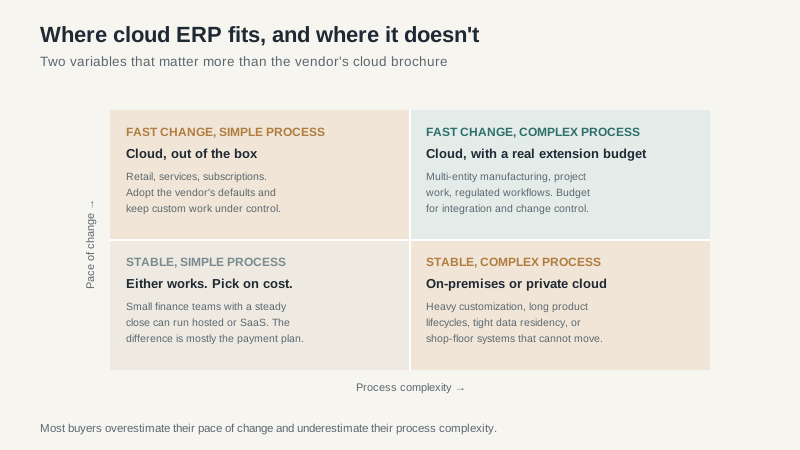
Ask four questions before the vendor presentation.
How much of our process is genuinely unusual? Not “important.” Unusual. Every company thinks its process is special. Some are right. If yours is not, the cloud product’s defaults are a feature, not a limitation.
How fast does the business change? Acquisitions, new products, new countries, and new channels favor cloud because the vendor carries more of the change burden. A stable, single-product business can afford to optimize for cost instead.
What is our real IT capacity? Not the org chart. The actual people available to run infrastructure, manage upgrades, and handle security. If the answer is “one person and a contractor,” cloud is usually the safer bet.
What happens at renewal? Model a 5 percent annual increase and a 20 percent increase. If the second scenario breaks the business case, negotiate harder now. Cloud contracts are easier to fix before signature than after.
The uncomfortable truth
Cloud ERP is an operating model, not a cost-saving button. It shifts spending from capital to operating, from internal staff to vendor, and from control to standard process. For most mid-market companies, that trade is worth it. For some, it is not.
The companies that regret the move are usually the ones that bought the subscription and kept the old process. They paid for a modern system and got a faster version of the same mess. The companies that do well treat the migration as a process project with a software component, not the other way around.
If you are comparing platforms next, the Oracle ERP guide and the NetSuite guide cover two of the most common cloud options in the US mid-market. Read them before the demo, not after.
