The first ERP quote I sat through was $48,000 in licenses. The project closed just under $400,000. Nobody lied to us. We simply kept discovering things the quote did not cover: the integration to the old order system, the customer master cleanup, a contractor to rebuild the commission report, and six extra weeks of a consultant who billed in fifteen-minute increments.
By the time the CFO asked what happened, the honest answer was that we had bought software and then had to build a company around it.
That pattern is common enough that I now treat the license quote as a down payment, not a budget. ERP software is not expensive because the software is expensive. It is expensive because it touches every process that makes money, and those processes were never as clean as the brochure assumed.
What ERP software actually does
ERP holds the operational spine of a company. The general ledger, purchasing, inventory, production, order management, and the reporting that ties them together. CRM keeps the pipeline. ERP keeps the commitments. If a customer orders 400 units and finance invoices 320, ERP is where the difference should be visible before anyone picks up the phone.
The pitch is one set of records. One customer, one item master, one chart of accounts, one version of what happened. That is worth real money. When the same part number has four descriptions and two costs, every meeting starts with an argument about whose spreadsheet is right.
Most companies do not wake up one morning needing ERP. They back into it. The month-end close stretches from five days to twelve. Inventory records disagree with the warehouse. Sales quotes a delivery date that production cannot hit. Someone builds a second spreadsheet to reconcile the first one, and that spreadsheet becomes the real system.
If two departments can no longer agree on a number without a meeting, you have already left spreadsheet territory. The question is whether you are ready to fix the process along with the software.
The purchase is four purchases
Most buyers anchor on the license quote because it is the only number a vendor will put in writing early. It is also the smallest line in the program. In the mid-market ERP projects I have worked on, a rough split of first-year spend looks like this:
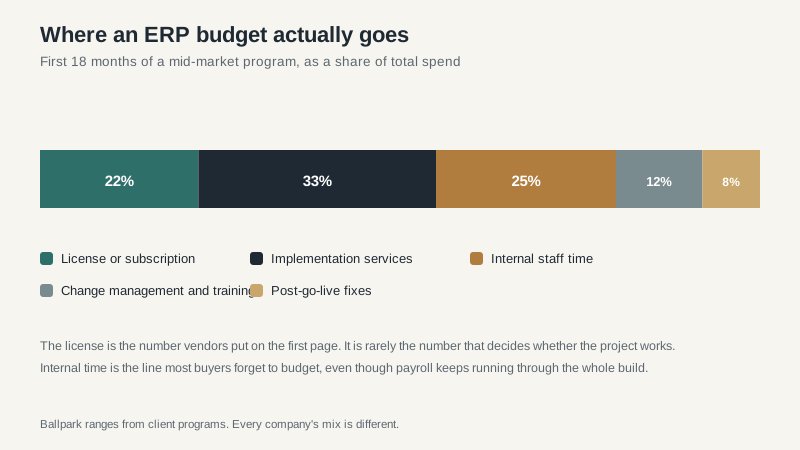
License or subscription. Twenty-two percent, give or take. This is the number everyone negotiates and the one that matters least over a five-year horizon.
Implementation services. A third of the budget, often more. Partners configure the system, migrate data, build integrations, train users, and sit in the room when the first close goes sideways. A good partner is worth the money. A bad one costs twice as much because you pay someone else to fix the work.
Internal time. The line nobody budgets. Your controller, warehouse manager, and IT lead will spend a meaningful part of the year on this project. If your controller makes $140,000 and spends 30 percent of her time on ERP for nine months, that is roughly $31,000 of payroll that does not appear on the vendor’s invoice. Multiply it by the people in the room.
Change management and training. Twelve percent is optimistic for a company that has never run a structured rollout. People do not resist software because they are difficult. They resist because their work is about to change and nobody has explained what happens to the parts they were good at.
Post-go-live fixes. Even a well-run project has a list. Reports that need another column, a workflow that fires twice, a permission that blocks the month-end close. Plan for eight percent and be pleasantly surprised when you spend less.
What “fit” actually means
Vendors love the word fit because it sounds objective. In practice, fit usually means whether the demo team can make your process look like a standard workflow for forty-five minutes.
A better test: give every shortlisted vendor the same scripted scenario and make them run it live. Not a slide. Not a pre-configured demo tenant with sample data. Your scenario, their system, no rehearsal.
Use your ugliest transaction. A return with a serialized item, a restocking fee, a credit memo that has to hit the prior period, and a customer who is also a vendor. If the system handles that without a consultant jumping in to explain what the screen would normally do, you have learned something. If it cannot, you have learned something more valuable.
Fit is also about the work around the software. Does the vendor have a partner in your region who has implemented this product for a company like yours? Can you talk to two of those companies? Does the product have a realistic path for the customization you actually need, or will you be maintaining a fork forever?
Those questions do not show up in a feature comparison. They decide whether the project is boring or memorable.
The selection process that works
I have watched companies spend eighteen months selecting ERP software. The business case expired before the contract was signed. I have also watched a $30 million distributor pick a system in ten weeks and go live on time. Speed is not the goal, but a process with clear gates prevents the endless evaluation that feels safe and quietly kills momentum.
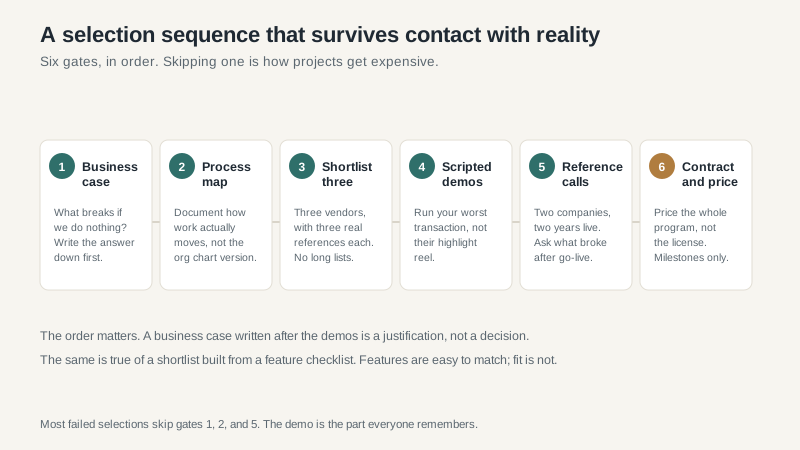
Business case. Write down what breaks if you do nothing for another year. If the honest answer is “nothing this year,” you may have a process problem, not a software problem. That is worth knowing before you spend $200,000.
Process map. Document how work actually moves. The warehouse version, not the version in the SOP binder. Include the exceptions. ERP projects are mostly a tour of your exceptions.
Shortlist three. More than three vendors is a hobby. Fewer than three is a negotiation problem. Pick three that fit your size, industry, and budget, and make sure each one has at least two live references in your region.
Scripted demos. Send the script five days ahead. Require the actual implementation consultant, not just the sales engineer, to run it. Watch how they handle the part that does not work. Every system has a part that does not work.
Reference calls. Two companies, two years live, same product, similar size. Ask what broke in month seven, how the partner handled it, and what they would do differently. If the vendor only offers references who are happy to talk about the sales process, ask for different ones.
Contract and whole-program price. Get implementation, data migration, integrations, training, and first-year support in one document. Tie payments to milestones. Cap change orders or at least define the rate. Name acceptance criteria before signatures, not after the first UAT failure.
Where implementations go sideways
Data. Every ERP project promises a data migration. Most of them mean a data cleanup with a deadline. Customer master, item master, open purchase orders, historical balances, and the twelve years of “temporary” part numbers that nobody wants to touch. Start the cleanup before you pick the software. It is the one task that helps regardless of which vendor wins.
Integrations. Ecommerce, EDI, payroll, the bank, the warehouse scanner, the commission tool that only one person understands. An integration is not done when data moves. It is done when the data reconciles and someone owns the exception report. Budget for the exception report.
Customization. The most expensive sentence in ERP is “can you make it work like the old system?” Sometimes the answer should be yes. Often it should be “we could, but here is what that costs to maintain.” Custom code is a mortgage. You pay it every upgrade.
Adoption. Training is not a two-hour webinar and a PDF. It is a warehouse supervisor who knows exactly what to scan, a controller who can close the month without calling the partner, and a sales team that trusts the inventory number on the screen. If people keep a shadow spreadsheet after go-live, the project is not finished. It has simply moved.
When you should not buy
Do not buy ERP if the underlying process is broken and nobody has authority to fix it. Software will make the broken process faster and easier to audit. That is not an improvement.
Do not buy if the company is too small for the overhead. A $5 million services business with one bookkeeper does not need a six-figure implementation. It needs clean accounting and a system that fits the work.
Do not buy in the middle of an acquisition or a sale process unless the timeline is real. I have seen a private equity rollup buy three ERPs in two years because each operating company had its own idea of urgent. The integration cost more than the systems.
What I would do differently
Budget one and a half to two times the implementation quote. Not because partners always overrun, but because the quote is built on assumptions that will not survive your data.
Name an internal owner with real authority. Not a project coordinator who takes minutes. Someone who can tell the warehouse manager that the old process ends on a specific date and has the standing to make it stick.
Call references without the vendor on the line. Ask about the month after go-live, not the demo. That is where the truth lives.
And write the business case before the shortlist. If the numbers only work when everything goes perfectly, they do not work. ERP software is a capital project disguised as a software purchase. The license is the easy part to compare. The rest is where the outcome is decided.
If you are still choosing between deployment models, the cloud ERP guide covers where the cost curves cross. If your shortlist includes the big platforms, start with Oracle ERP, NetSuite, and Microsoft ERP before you take a demo. They are not interchangeable, and the difference is mostly in who has to do the work.
